
I used to spend way too much time fiddling with my old projector, trying to get a good picture in my living room. The colors always looked dull, and every dark scene turned into a messy gray blur. It honestly made movie nights more frustrating than fun.
So I decided I needed a new projector…
In this VisionMaster Pro projector review, I reveal all the good and bad aspects of this popular laser projector after using it for 6 months.
Was it worth it in the end?
Specs Breakdown
🔆 Brightness: Rated for 2500 ISO Lumens, with some users reporting output near 3000 ISO Lumens in real use.
📐 Optics: OpticFlex Lens System with a 0.9 to 1.5 throw ratio, 2× optical zoom, auto-focus, and auto keystone correction.
📡 Connectivity: Includes Bluetooth 5.2, Wi‑Fi 6E, Ethernet, HDMI 2.1 ports, USB 3.0, and audio out options with eARC support.
🎮 Gaming Features: 4 ms input lag with support for refresh rates up to 240 Hz and gaming modes including RPG, FPS, and RCG.
🎁 Included Accessories: Comes with a Bluetooth and IR remote, a protective carrying case, and premium packaging.
🧠 Smart Platform: Runs on AI-SoC MT9618 with 4 GB RAM and 128 GB ROM, featuring built-in Google TV plus AirPlay 2, Miracast, and Chromecast support.
🎨 Color and Contrast: Triple-laser system covering 110% of Rec.2020 and a 15,000:1 contrast ratio with Enhanced Black Level technology.
⚖️ Physical Dimensions: Weighs 15.4 pounds and measures 7.48 by 9.45 by 10.24 inches.
📏 Projection Size: Capable of projecting images up to 300 inches diagonally.
💡 Display: Native 4K UHD resolution at 3840 × 2160 pixels with HDR10+ and Dynamic Tone Mapping.
Exclusive VisionMaster Pro Discount For Our Readers
We’ve managed to get a pretty substantial discount on VisionMaster Pro for our readers. However, due to its popularity and the substantial discount, there’s a possibility it might sell out soon. So if you’re considering this, now might be the best time.
Click Here To Get VisionMaster ProMain Points
🔵 The VisionMaster Pro delivers deep blacks and vivid colors thanks to its triple laser system and high contrast ratio, creating detailed images even in dark scenes.
🔵 Its flexible zoom and throw ratio make positioning easy in both small and large rooms, while auto focus and keystone reduce setup time.
🔵 With brightness reaching close to 3000 ISO lumens, this projector handles some ambient light well but may still benefit from a quality screen for best results.
🔵 Low input lag and support for up to 240 Hz refresh rate target gaming, though using keystone correction might slightly increase delay.
🔵 The built in Google TV platform and broad casting compatibility remove the need for extra streaming devices, but some users report occasional software quirks during setup.
🔵 Weighing over 15 pounds with a single mounting screw, this unit calls for thoughtful mounting solutions if installed permanently.
🔵 The onboard processor and storage allow smooth multitasking and app use, but image adjustments can require patience to get just right with the sensitive zoom controls.
Advantages Of VisionMaster Pro
✅ Exceptional Contrast and Deep Blacks
The VisionMaster Pro laser projector boasts a 15,000:1 contrast ratio combined with Enhanced Black Level technology.
This setup creates noticeably richer blacks than many competitors, adding depth to night scenes and shadowed areas. It makes movie and gaming visuals pop with more detail in dark parts of the image.
Seeing subtle details in dimly lit environments is important for immersive viewing. This projector reveals textures and layers that often get washed out in less capable devices. The result is a much clearer and more natural picture when watching cinema-quality content and HDR scenes.
Thanks to these strong contrast capabilities, the image carries a more cinematic feel overall. It handles complex lighting and shadow effects without losing clarity or flattening the scene. For those who want a true home theater vibe, this is a significant benefit.
✅ Wide Color Gamut for Richer Hues
One standout feature is the projector’s ability to cover 110% of the Rec.2020 color gamut. This means colors come through much more vivid and lifelike than standard projectors. Reds, greens, and blues all show up with more richness that matches film and broadcast standards.
This wide color coverage helps faithfully reproduce cinematic palettes, making animated and live-action content look more natural. The extra color volume also impacts how skin tones and landscapes appear, offering a more pleasing and realistic view.
For anyone wanting their projector to display as close to the original content creator’s intention as possible, this wide gamut is a real advantage. It cuts down on dull or washed out colors that spoil the experience.
✅ Flexible Placement with Zoom and Throw Range
The OpticFlex Lens System with a throw ratio of 0.9 to 1.5 and 2 times optical zoom offers excellent placement versatility.
This means it can work well for both compact rooms and larger spaces without needing to move the projector far.
Adjusting the zoom and throw lets you fine-tune the image size without losing focus or sharpness. It also helps avoid awkward projector spots that might get in the way. Users can set up in diverse environments, from small living rooms to dedicated home theaters.
This flexibility removes many constraints tied to projector positioning, letting you adapt the device to the space available. It saves hassle, especially in homes where permanent mounts or ideal distances are hard to achieve.
✅ Bright Images Even in Ambient Light
The VisionMaster Pro triple laser projector is strong on brightness, listed at 2500 ISO lumens with reports up to around 3000 lumens in everyday use.
This helps keep images sharp and clear even when daylight or room lights are on.
High brightness means less need to darken the entire room for a good viewing experience, making the projector more practical for varied living spaces. It performs well whether you’re watching movies during the day or streaming in a room with some background lighting.
This capability expands usability beyond just nighttime conditions. It means you can enjoy vivid, punchy visuals without fumbling for full blackout or heavy curtains.
✅ Fast Response and Smoother Gameplay
Gamers benefit from a low input lag of around 4 milliseconds, which cuts down on delay between controller commands and on-screen motions. This makes the VisionMaster Pro laser projector suitable for competitive or fast-paced titles.
Coupled with support for very high refresh rates up to 240 Hz, it delivers fluid animation and screen updates that keep action scenes crisp. Special gaming modes tailored for RPG, FPS, and racing games include helpful overlays like crosshairs or night vision.
These gamer-friendly functions improve reaction times and gameplay immersion by reducing lag and offering image adjustments optimized of different genres.
It’s a solid choice for dedicated console or PC players.
✅ Built-In Smart Features with Google TV
The projector includes Google TV built into its AI-SoC chipset, allowing streaming without needing extra devices. This provides access to a wide variety of apps and content natively. Plus, casting standards like AirPlay 2, Miracast, and Chromecast cover almost all mobile devices.
Voice control through Alexa, Google Home, and Apple HomeKit extends convenience and smart home integration. This cuts down on remote juggling and lets users manage the projector hands-free or as part of connected setups.
Having a powerful smart platform onboard also means smoother multitasking, thanks to 4 GB RAM and 128 GB storage. It can store apps locally and switch between content sources more quickly than simpler smart projectors.
✅ Multiple Connectivity Options for Modern Setups
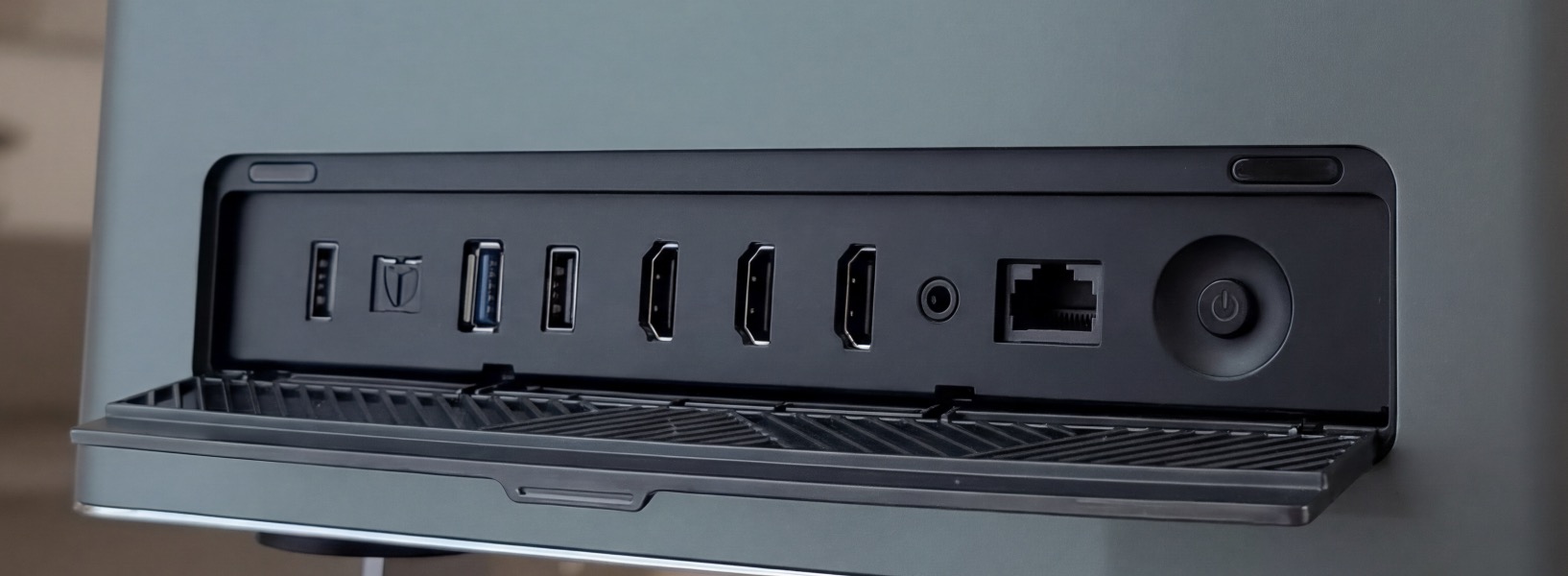
With HDMI 2.1, USB 3.0, Ethernet, Wi‑Fi 6E, Bluetooth 5.2, and eARC support, this projector covers nearly every connection type a user might need.
Two HDMI inputs let you plug in gaming consoles, Blu-ray players, or streaming boxes simultaneously.
Wi-Fi 6E and Bluetooth 5.2 ensure better wireless streaming and peripheral pairing, while Ethernet provides a steady network link for stable content delivery. eARC and analog audio outputs allow integration with external sound systems for more immersive audio.
This wide variety of ports and wireless tech makes the VisionMaster Pro laser projector fit well into modern entertainment ecosystems. It’s ready for diverse media setups without relying on converters or extra hubs.
✅ Convenient Auto-Focus and Keystone Correction
The auto-focus and auto-keystone features make setting up a large, sharp image much less frustrating. The projector detects screen edges and automatically adjusts zoom, focus, and image geometry to give a perfectly rectangular, clear picture.
These functions save time and reduce guesswork during initial installation or when moving the projector around. Even with uneven surfaces or non-ideal angles, the image stays aligned and watchable.
This automation helps less tech-savvy users get a satisfying picture more easily while leaving room for manual fine-tuning if desired. It removes a common headache in projector setups.
✅ Large and Portable Design with Protective Case
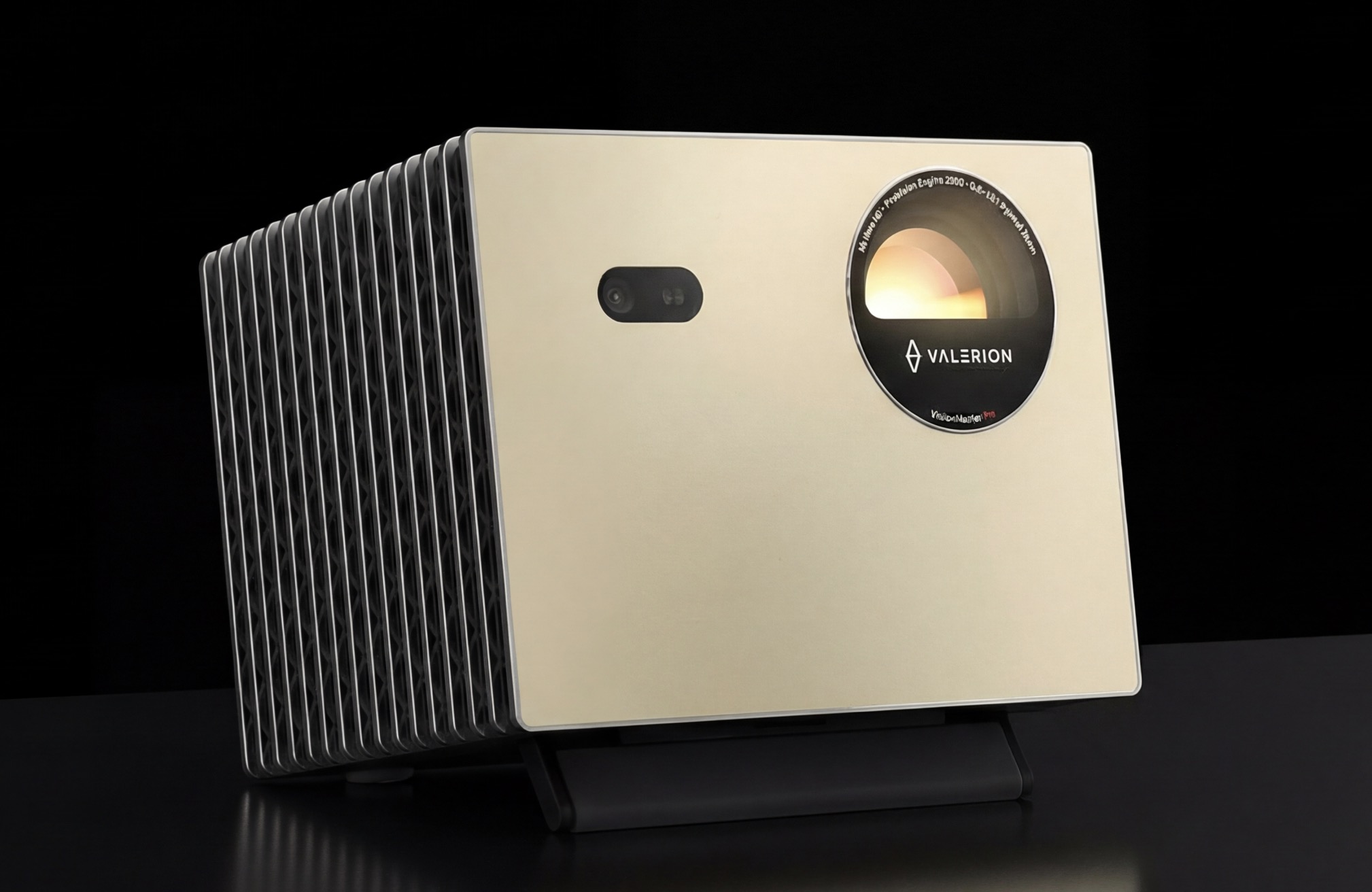
Though not the smallest or lightest, weighing 15.4 pounds, the Valerion VisionMaster Pro projector comes with a sturdy metal build and a premium carrying case that protects it during transport. This makes it portable enough for moving between rooms or locations.
The integrated kickstand allows temporary placement without bulky mounts or dedicated furniture. This adds convenience for users who need short-term setups, such as presentations or gaming sessions outside the usual home theater.
This combination of quality construction and portable accessories makes the projector feel more versatile than typical home cinema units. It balances solid build with the option to relocate as needed.
The Bad Aspects Of VisionMaster Pro
❌ Visual Artifacts Affect Viewing Experience
Because of the triple-laser DLP light engine used here, some viewers may notice rainbow effects or laser speckle on the projected image. These can appear as occasional distracting streaks or shimmer, especially for those sensitive to such visual artifacts.
Light spilling outside the screen borders and uneven brightness zones have also been reported, which detracts from the image uniformity. These issues are subtle but noticeable in dark scenes or on certain wall colors.
While some of these effects can be reduced by careful room setup and screen choice, they remain a limitation of this projector’s technology that might bother users seeking flawless visuals.
❌ Heavy and Bulky Design
The VisionMaster Pro projector weighs in at over 15 pounds, which is quite heavy compared to many home projectors in its class. This means moving it around casually or setting it up for quick use can feel cumbersome. If you want to use it in multiple rooms or bring it to gatherings often, the size and weight might slow you down.
Because of its substantial build, it usually calls for a more permanent installation method. You might need sturdy mounting hardware and careful planning for placement. Casual portability is not its strong suit, even though it includes a protective carrying case.
While the premium metal chassis adds durability, the heft can be a drawback if you expect to reposition the Valerion VisionMaster Pro laser projector regularly or on the fly. It’s more suited for rooms where it stays put.
❌ Google TV Platform Has Quirks
The smart platform built into this projector runs Google TV, but the experience is not without frustrations. Several users reported glitchy login or initial setup processes that can delay getting started. Navigation quirks include a back button that sometimes exits the system instead of returning to previous menus.
Such quirks can make streaming apps feel less smooth than expected and occasionally cause confusion. Also, the Ethernet connection tops out at 100 Mbps on this platform, which might bottleneck very high bitrate streams from the network.
For a device billed as an all-in-one streaming hub, these software rough spots reduce convenience. Using external streaming devices may fix this, but it takes away from the integrated appeal.
❌ Image Adjustments Can Be Sensitive
The VisionMaster Pro projector has an optical zoom and digital zoom combo that can feel overly sensitive when fine-tuning the image size and position. Users have noted that making small changes often results in overshoot or image spill beyond the screen edges.
Auto keystone and focus corrections are helpful but sometimes cause minor clarity loss or processing delay during gaming. In some cases, keystone correction may introduce noticeable input lag, which is frustrating for competitive play.
If you want perfect edge-to-edge fitting without cropping or distortion, expect to spend time working the zoom and correction settings precisely. This can be tedious and might require trial and error.
❌ Single Screw Mounting Limits Options
This projector uses a one-point mounting design with a single screw at the top or bottom of the unit. That’s different from the classic three-point mounts you see on most projectors. As a result, getting a secure and level ceiling or wall setup requires special mounts or adapters.
For those wanting a neat, flush installation, this can be a hassle. You may spend extra effort finding compatible mounting hardware or improvising a solution. Small errors in tilt or alignment might be tougher to fix due to the lack of multiple mounting points.
If you’re installing the VisionMaster Pro triple laser projector permanently, plan carefully ahead. This mounting style could complicate neat, stable setups more than usual.
Understanding How This Device Works
The VisionMaster Pro uses a triple-laser RGB light engine to create its images. Three separate laser sources emit red, green, and blue light, which then combine to produce the full color spectrum. This setup feeds into a lens system that can adjust throw distance from 0.9 to 1.5, letting the projector create images of different sizes without physically moving it far from the screen.
An optical zoom lets the image size be fine-tuned by a factor of two, while automatic focus ensures that the picture stays sharp as distance or screen size changes. The projector also has sensors that detect the shape and position of the projection surface, triggering auto keystone correction to straighten the image and remove any trapezoidal distortion. This means the projected image looks rectangular even if the device is at an angle.
Inside, there is an AI-capable chipset paired with 4 GB of memory and 128 GB of storage. This processor handles both the smart platform interface and image enhancements. It performs real-time dynamic tone mapping, adjusting HDR brightness and shadows on a scene-by-scene basis. It also runs AI upscaling algorithms that try to sharpen lower resolution content closer to native 4K quality. The system multitasks across apps and streaming services using its onboard resources.
When connected to gaming consoles or PCs, the projector switches to a low-latency mode.
This reduces signal processing delay to around 4 milliseconds and supports refresh rates as high as 240 Hz for compatible ultra-wide format content. Built-in game modes adjust display settings for different genres like FPS or RPG, and features such as crosshair overlays and night vision help customize the gaming experience.
The built-in smart system runs Google TV, providing access to streaming apps directly on the projector without additional devices. It supports wireless display casting via AirPlay 2, Miracast, and Chromecast protocols, so compatible phones and tablets can mirror or push content seamlessly. Voice commands work through Alexa, Google Home, and Apple HomeKit integration, enabling hands-free control.
For wired connections, it has HDMI 2.1 ports, USB 3.0 inputs, Ethernet networking, and Bluetooth 5.2 for accessories. Wi-Fi 6E allows high-speed wireless streaming. Audio output comes through optical and analog jacks, plus eARC support to send higher-quality sound to external audio receivers or soundbars.
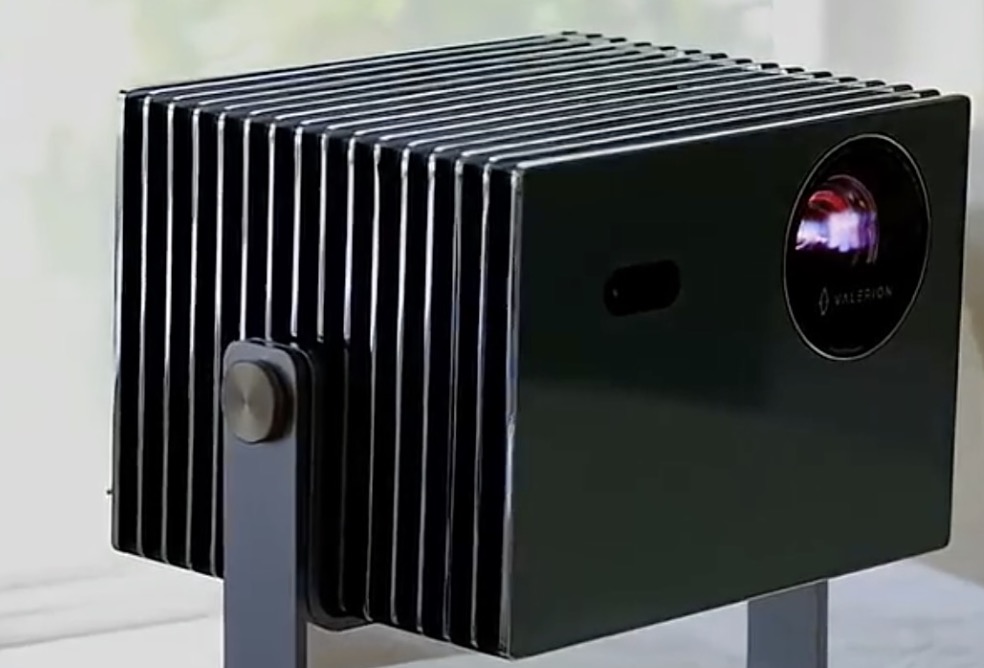
The projector’s physical design includes a metal chassis housing and weighs just over 15 pounds. Inside that body, the lens and sensor systems align automatically on startup and continuously adjust if the projector is moved. There’s an integrated kickstand for temporary placement on flat surfaces, and it fits into a protective carrying case for transport.
When a source is connected, the projector’s internal software identifies it and chooses the proper processing pathway. It looks for HDR10+ metadata to optimize dynamic range and color beyond standard HDR10. If the content lacks native 4K, the AI Super Resolution engine kicks in to enhance sharpness, edge definition, and overall detail. Focus adjustments are handled by small motors guided by sensor feedback rather than manual tuning.
That single mounting screw option for ceiling or bracket installs means the physical alignment relies heavily on the projector’s digital corrections.
Its software compensates for tilt and angle, but physical leveling requires careful hardware support. The image adjustments happen quickly, with only brief delays as sensors scan edges and autofit the display.
Inside the optics are high-quality lenses engineered to reduce chromatic aberrations and flare.
Laser light sources help maintain consistent brightness across the entire image and provide a wider color volume than traditional lamps. The triple-laser approach minimizes color breakup or rainbow effects typical of some other projection technologies, though sensitive eyes might still notice minor artifacts.
When streaming or playing locally stored content, the projector uses its internal memory to cache data and speed up load times.
The AI-SoC handles app switching without full reboots, and connection protocols prioritize stable data streams to avoid buffering. Firmware updates can be installed from the network to improve image processing algorithms or address bugs in the user interface.
Audio signals coming out of the projector can be routed internally to basic speakers or sent externally through multiple output ports. eARC support means it can pass lossless or high-bitrate surround sound formats to compatible home theater equipment, requiring no additional audio converters.
The whole setup runs on an integrated software layer that manages inputs, image processing, user interface, and network connectivity simultaneously. This enables the projector to handle complex tasks like HDR tone mapping, AI sharpening, and gaming enhancements without noticeable lag or stutter. That part surprised me, given the variety of demanding functions happening at once.
My VisionMaster Pro Experience
Setting up the VisionMaster Pro projector was a bit of a mixed bag at first. The auto focus and auto keystone features helped save a lot of time, but the precise zoom adjustments were tricky to nail down without going over the edges of my screen. Took a few tries to get the image lined up just right without clutter, especially because the digital zoom felt a little touchy.
Watching darker scenes really stood out with this projector. The blacks were deep, and I could see details that often get lost in shadowy parts of movies.
The color was vibrant too, thanks to that wide color gamut. It made some films and games much more immersive, though the occasional slight light spill outside the image border was noticeable in some setups.
Gaming sessions benefited from the low input lag claim. The 4 ms delay made fast reflex games feel responsive and tight. The high refresh rate support with ultra wide formats helped smooth out motion, and the presets for RPG, FPS, and racing games actually added useful tweaks like crosshairs and night vision. That said, using auto keystone during gameplay sometimes seemed to add a tiny bit of lag or soften edges, so I preferred to keep it off for competitive rounds.
The onboard Google TV platform felt powerful on paper, but navigating menus took some patience. The back button often exited the app unintentionally. Logging in through Google TV was fiddly at times, with some odd orientation options that confused my ceiling mounting. Streaming quality was generally good, but I did notice that playing through external devices occasionally had sharper results for high bitrate content compared to native apps.
Physically the unit is solid but heavy. The metal chassis adds a premium feel but lugging it around for temporary setups was a workout. The single mounting screw on top called for some creative mounting solutions since it’s not the usual three point system. That stood out as something installers should plan for carefully.
Over time, the AI driven image enhancements and dynamic tone mapping made HDR content pop without crushing highlights or shadows. Watching movies with IMAX Enhanced mode was impressive, especially on my larger screen where the projection size approached 300 inches. The little details in color and depth made a difference that felt cinematic.
Some visual quirks appeared sporadically, like mild rainbow effects or laser speckle spots in certain lighting. Those moments were rare enough to be a mild annoyance rather than a deal breaker, but worth noting if you are sensitive to such artifacts. Also, some firmware updates improved system stability, addressing occasional sensor glitches that popped up early on.
Overall, the VisionMaster Pro laser projector delivered high impact home cinema and gaming experiences once dialed in, but patience was needed through the fine tuning and software quirks. The premium build, powerful features, and vivid image performance rewarded sticking with it beyond the initial learning curve.

Who Can Benefit From This?
Different people see value in the VisionMaster Pro projector for different reasons. Some want amazing movie nights. Others look for top notch gaming or just a simple way to stream. I’ve noticed it’s not about just one feature. It’s about how this projector fits into real lives, routines, and hobbies.
Here are some examples of who matches well with this device:
Detail Oriented AV Tweaker
Settings are fun for this person, not a chore. They’ll dig into every calibration option, try different modes for films and games, and care about getting maximum richness out of their expensive screen.
ISF certification and manual image controls make them feel right at home. They enjoy squeezing every ounce of performance the Valerion projector offers.
Cautious Shopper Who Hates Wasted Effort
Some people don’t want to buy a new device every year. They want one thing that checks as many boxes as possible and just works.
The robust build and warranty, plus positive reports of support, matter more than fancy marketing. It’s about getting good value and knowing if something goes wrong, there’s help available.
Each of these users would get something real out of the VisionMaster Pro. But what stands out is how the projector fits each lifestyle differently, depending on what’s important to them.
Frequent Host or Party Organizer
For this user, entertainment is always center stage. Maybe it’s big game day, or setting up karaoke at a family BBQ.
The VisionMaster Pro laser projector can handle bright rooms, show a huge image, and move from house to yard. The included case makes it simple to share or set up wherever the action is.
Tech Enthusiast Who Loves Smart Features
Top specs make this person happy, but ease of use is just as important. They love a gadget that replaces two or three things. They appreciate casting from their phone, auto focus, or hands free voice control. Built in Google TV means they watch what they want without hunting for remotes or switching cables.
Competitive Console Gamer
Gaming isn’t just a hobby, it’s a way to relax or show off skills. This person hates lag and wants every movement to show up instantly.
They use high refresh rates to play their best. Features like 4 ms input lag and special gaming modes matter more than anything. It’s a relief to switch from TV to projector and keep that same fast, sharp response.
Home Theater Movie Buff
This person wants their living room to feel like a real cinema. They care about blacks that look deep, colors that pop, and the kind of detail that makes you see something new in every film. The VisionMaster Pro projector gives them everything they need for movie nights that wow their friends. Lifelike colors and HDR are big must haves on their list.
My Final Verdict
There’s a lot to appreciate in the VisionMaster Pro laser projector, especially if you want rich colors and deep blacks in a large format. The combination of triple laser light and a wide color gamut really makes images pop, and the HDR10+ with dynamic tone mapping adds a subtle but important layer of enhancement that some projectors miss. It’s not perfect, though.
The weight and mounting system make it less friendly for quick moves or ceiling installs without some extra effort. Small quirks in the Google TV platform also remind me that even advanced tech can have rough edges.
I noticed the gaming features stand out with that low input lag and high refresh rate support. If you play competitive or fast paced games, this could catch your interest. But the very sensitive zoom and keystone corrections mean setup might take more patience than expected.
The projector’s brightness lives up to the claims better than many, which is a big plus for rooms that aren’t completely dark. Still, some light bleed and laser speckle can show up, so placement matters more than people might assume.
This Valerion VisionMaster Pro projector gave me plenty to think about in terms of balancing high end picture quality against the practical challenges of size and software quirks. It’s probably not for everyone, but if you appreciate a vivid, sharp image and are willing to adjust and tune it, it could be a rewarding fit.
Thanks for sticking with me through this Valerion VisionMaster Pro review and I hope you’re now clear on whether it’s for you or not.
FAQs: Everything You Need To Know
Can I use this projector for competitive gaming?
Yes, it’s designed with gaming in mind. It boasts a low input lag of about 4 milliseconds, which helps reduce delay between your controller inputs and what you see on the screen. Plus, it supports refresh rates up to 240 Hz on certain formats.
There are dedicated gaming modes tailored for different styles like RPG, FPS, and racing games, along with features like on screen crosshairs and night vision for better visibility in dark scenes.
How flexible is the placement of this projector in different room sizes?
The built in OpticFlex lens system provides a throw ratio between 0.9 and 1.5, along with 2 times optical zoom. This setup lets you place the projector closer or further from the screen and still fill a large image. It can project up to 300 inches diagonally, making it suitable for both small rooms and bigger home theaters. Plus, automatic focus and keystone correction simplify setup regardless of where you place it.
What kind of image quality can I expect with the VisionMaster Pro projector?
You get native 4K resolution with HDR10+ support and Dynamic Tone Mapping, which improves the clarity and detail of HDR content scene by scene. Its triple laser system covers 110% of the Rec.2020 color space, offering vivid and accurate colors. The Enhanced Black Level technology combined with a 15,000 to 1 contrast ratio helps reveal deeper blacks and finer shadow detail—crucial for dark movie scenes or gaming environments.
I heard the projector can be heavy. Does that make it hard to move around or install?
It weighs about 15 and a half pounds, which is heavier than many portable models.
The metal case gives it a solid feel but means it’s not really something you’ll toss in a bag for casual carry. However, it comes with a protective carrying case and an integrated kickstand for easier temporary placement. For permanent mounting, keep in mind it uses a single mounting screw system, so you might need special adapters or hardware for secure installation.
Does the built in Google TV platform work well for streaming?
Google TV is built into the projector, allowing you to stream apps like Netflix and YouTube without extra devices. It supports casting standards like AirPlay 2, Miracast, and Chromecast too. That said, some users found the login process a bit tricky and the menu navigation unintuitive at times. Streaming quality can also vary; in certain cases, external devices like a gaming console or dedicated media player might deliver better video fidelity.
How bright is the VisionMaster Pro triple laser projector in real life?
The official brightness rating is 2500 ISO lumens, but many users have noticed it actually pushes closer to 3000 ISO lumens in practical use. That means the image stays clear and visible even in rooms with some ambient light.
It’s bright enough for daytime viewing on medium to large screens without needing total darkness. Keep in mind, room conditions and screen type will still impact the perceived brightness.
Can this projector connect with my smart home system easily?
Yes, it supports voice control through Alexa, Google Home, and Apple HomeKit. That means you can control power, volume, and input with your voice if you have smart speakers or devices from those ecosystems.
Connectivity includes HDMI 2.1 ports, USB 3.0, Bluetooth 5.2, Ethernet, and Wi‑Fi 6E, so plugging in consoles, sound systems, or network sources should be straightforward. It also supports eARC for high quality audio integration with external sound setups.
Get VisionMaster Pro Now
Thanks for checking out my VisionMaster Pro review. You can get the special discounted (readers only) on this product by clicking the button below. Thanks for reading 🙂
↓ Click Here Now